With the first release of Hytale finally approaching, the developers are still working through getting it running on Linux and macOS. As covered on GamingOnLinux previously, the developers did confirm they were working on both versions officially now.
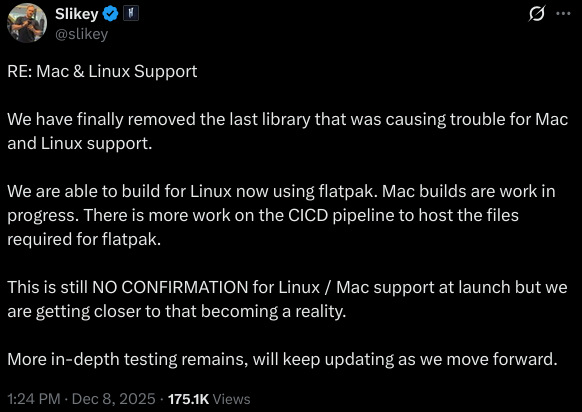
At least now we know how you'll be getting it, with the developer doing it via a Flatpak which means you should be able to install it across many different distributions.
In a post on X/Twitter from Kevin Carstens, the Co-Founder and Tech Director for Hytale, said:
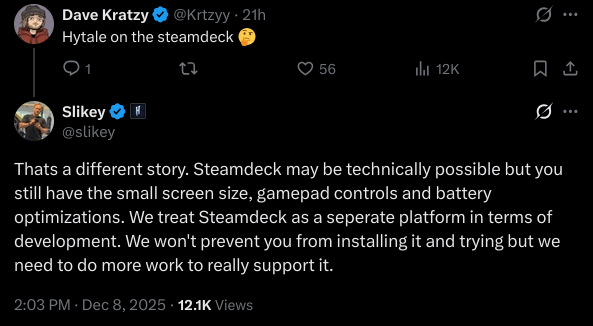
And for those wanting to play it on Steam Deck, it may technically work since it will have a Linux version but may not feel very good right now:
There's also no gamepad support at launch, but it's next up on the accessibility roadmap.




About the author - Liam Squires-Hand

I am the owner of GamingOnLinux. After discovering Linux back in the days of Mandrake in 2003, I constantly checked on the progress of Linux until Ubuntu appeared on the scene and it helped me to really love it. You can reach me easily by emailing GamingOnLinux directly. You can follow me personally on Mastodon [External Link].
See more from me
See more from me
Some you may have missed, popular articles from the last month:




 You can also find comments for this article on social media:
 All posts need to follow our rules. Please hit the Report Flag icon on any post that breaks the rules or contains illegal / harmful content. Readers can also email us for any issues or concerns.
11 comments


flatpak :sick:
no appimage?
i guess someone can extract the client from it and build an actual package
nice to see linux support though
no appimage?
i guess someone can extract the client from it and build an actual package
nice to see linux support though
2 Likes 👍 (2) See more...


Quoting: Xpanderflatpak :sick:I love how ridiculously divisive we all are as Linux users. :grin:
no appimage?
i guess someone can extract the client from it and build an actual package
nice to see linux support though
Dare I ask... why the hate for flatpak (a puke emoji, no less!)? If I can't install something directly, I want a flatpak. I'll use an AppImage and resent it, because it (often) doesn't create a menu item, it requires me to find a place for it to live (I usually bung them in ~/Misc/Apps or something), and doesn't update with the rest of my system. I won't use snap, as I'm not interested in YAI (yet another installer) when I already have flatpak.
11 Likes 👍 (11) See more...


Finally more developers using Flatpak ;) That's a good sign.
1 Likes 👍 (1) See more...


Quoting: scaineI love AppImage because I can treat my applications like data. I can organize them in my own custom structure, back them up, copy them between any of my Linux machines including my kids Steam Decks and they just work most of the time.Quoting: Xpanderflatpak :sick:I love how ridiculously divisive we all are as Linux users. :grin:
no appimage?
i guess someone can extract the client from it and build an actual package
nice to see linux support though
Dare I ask... why the hate for flatpak (a puke emoji, no less!)? If I can't install something directly, I want a flatpak. I'll use an AppImage and resent it, because it (often) doesn't create a menu item, it requires me to find a place for it to live (I usually bung them in ~/Misc/Apps or something), and doesn't update with the rest of my system. I won't use snap, as I'm not interested in YAI (yet another installer) when I already have flatpak.
5 Likes 👍 (5) See more...
Quoting: scaineI love how ridiculously divisive we all are as Linux users. :grin:Its fine if you like it.
Dare I ask... why the hate for flatpak (a puke emoji, no less!)? If I can't install something directly, I want a flatpak. I'll use an AppImage and resent it, because it (often) doesn't create a menu item, it requires me to find a place for it to live (I usually bung them in ~/Misc/Apps or something), and doesn't update with the rest of my system. I won't use snap, as I'm not interested in YAI (yet another installer) when I already have flatpak.
flatpaks are just awful with their runtimes and permissions. Appimage at least is fully self-contained sandbox, not some random runtime this and that here and there with sometimes no access to this or that unless you manually modify things.
each their own. I don't like my distro to become an android device.
native distro packages are prefered for me.
4 Likes 👍 (4) See more...


To add another wrinkle - how about a Flatpak that manages AppImages? :grin:
https://github.com/mijorus/gearlever
https://github.com/mijorus/gearlever
1 Likes 👍 (1) See more...
 hardpenguin 10 Dec 2025

AppImage was created by a bad person acting in bad faith in the open source community :whistle:
1 Likes 👍 (1) See more...


Quoting: PhlebiacTo add another wrinkle - how about a Flatpak that manages AppImages? :grin:That looks really nice in fact!
https://github.com/mijorus/gearlever
Quoting: hardpenguinAppImage was created by a bad person acting in bad faith in the open source community :whistle:Tell me more...
Last edited by Cyril on 10 Dec 2025 at 8:32 pm UTC
2 Likes 👍 (2) See more...
Quoting: XpanderAppimage is not a self-contained sandbox.Quoting: scaineI love how ridiculously divisive we all are as Linux users. :grin:Its fine if you like it.
Dare I ask... why the hate for flatpak (a puke emoji, no less!)? If I can't install something directly, I want a flatpak. I'll use an AppImage and resent it, because it (often) doesn't create a menu item, it requires me to find a place for it to live (I usually bung them in ~/Misc/Apps or something), and doesn't update with the rest of my system. I won't use snap, as I'm not interested in YAI (yet another installer) when I already have flatpak.
flatpaks are just awful with their runtimes and permissions. Appimage at least is fully self-contained sandbox, not some random runtime this and that here and there with sometimes no access to this or that unless you manually modify things.
each their own. I don't like my distro to become an android device.
native distro packages are prefered for me.
Appimage simply runs with the same permissions as the user that runs it(this includes root).
It can do anything the user can do without entering an extra password.
1 Likes 👍 (1) See more...
Quoting: scaineA fix for your appimage problem is [appimage-launcher](https://github.com/TheAssassin/AppImageLauncher).Quoting: Xpanderflatpak :sick:I love how ridiculously divisive we all are as Linux users. :grin:
no appimage?
i guess someone can extract the client from it and build an actual package
nice to see linux support though
Dare I ask... why the hate for flatpak (a puke emoji, no less!)? If I can't install something directly, I want a flatpak. I'll use an AppImage and resent it, because it (often) doesn't create a menu item, it requires me to find a place for it to live (I usually bung them in ~/Misc/Apps or something), and doesn't update with the rest of my system. I won't use snap, as I'm not interested in YAI (yet another installer) when I already have flatpak.
1 Likes 👍 (1) See more...
Quoting: LoudTechieThanks! But another fix is to avoid AppImages, haha! :grin:Quoting: scaineA fix for your appimage problem is [appimage-launcher](https://github.com/TheAssassin/AppImageLauncher).Quoting: Xpanderflatpak :sick:I love how ridiculously divisive we all are as Linux users. :grin:
no appimage?
i guess someone can extract the client from it and build an actual package
nice to see linux support though
Dare I ask... why the hate for flatpak (a puke emoji, no less!)? If I can't install something directly, I want a flatpak. I'll use an AppImage and resent it, because it (often) doesn't create a menu item, it requires me to find a place for it to live (I usually bung them in ~/Misc/Apps or something), and doesn't update with the rest of my system. I won't use snap, as I'm not interested in YAI (yet another installer) when I already have flatpak.
I think we have a slight problem with a packaging format that needs an external app to manage the packaging format. I suppose the same could be said of Flatpak needing flatseal, but now that Plasma has integrated that into the Plasma settings, I'm definitely a flatpak guy these days. Not for Steam... but definitely for everything else that I can't install easily with my existing package management tool!
1 Likes 👍 (1) See more...
 Patreon
 PayPal